By the end you'll know
- The four questions of threat modeling, and when to ask them
- How to draw a data-flow diagram, with its trust boundaries
- STRIDE: six kinds of threat, and which part of a system each one hits
- How to rate a threat by likelihood and impact, and why it reorders a list of findings
- Why the biggest risks to a cluster are often outside it
Before you start
- You need: Lesson 1 done, the kind cluster running, and
ghlogged in to GitHub. - This lesson changes nothing. The script reads the cluster and GitHub; the rest is thinking and drawing.
- Maps to Security+: domain 1 (threat modeling, risk), and domain 2 (threat actors, vectors and attack surfaces).
The short version
- Four questions: what are we working on, what can go wrong, what are we going to do about it, and did we do a good job?
- The assets: 20 Secrets, 4 of them sealed in a public repository, and a laptop holding the keys to all of it.
- The ways in: every app syncs itself from Git; the
defaultproject allows any repository, any namespace and any cluster-wide resource;mainisn't protected; and the guestbook followsHEADof someone else's repository. - The ranking: the laptop first, then a push to
main, then a compromised pod. Lesson 1's in-cluster findings are real, but they're third. - The plan: the order the rest of the track takes, and three quick fixes to do now.
Four questions
Lesson 1 was a list of what's wrong. A list doesn't say what to fix first, or what's missing from it. Threat modeling does, by starting from the other side: what would someone want from this, and how would they get it? Adam Shostack's version is four questions:
- What are we working on? Draw the system: its parts, its data, and how they talk.
- What can go wrong? Walk the drawing, part by part, with a checklist so nothing is skipped.
- What are we going to do about it? For each threat: fix it, reduce it, accept it, or hand it to someone else.
- Did we do a good job? Check the fixes worked, and redo the model when the system changes.
It's not a document for an audit. Done well, it's an hour with a whiteboard before building something, and again when something big changes. Done here, it's for a system that already exists, which is the common case.
What are we working on?
Three kinds of fact go into the drawing: what's worth protecting, the ways in, and the data flows. The script for this lesson, security02.sh, gathers them, read-only.
The assets
Every Secret in the cluster, by name and type, never the values:
kubectl get secrets -A -o json | jq -r '.items[] | [.metadata.namespace, .metadata.name, .type, (.data // {} | length), (if ([.metadata.ownerReferences[]? | select(.kind=="SealedSecret")] | length) > 0 then "sealed" else "-" end)] | @tsv'
.data // {} | lengthcounts the keys in each Secret without printing them.ownerReferences ... SealedSecret: the Sealed Secrets controller marks each Secret it makes as owned by its SealedSecret.
argocd       argocd-notifications-secret                     Opaque                               0  -
argocd       argocd-redis                                    Opaque                               1  -
argocd       argocd-secret                                   Opaque                               5  -
bookshop     bookshop-db                                     Opaque                               1  sealed
kube-system  bootstrap-token-abcdef                          bootstrap.kubernetes.io/token        6  -
kube-system  sealed-secrets-keygzzt8                         kubernetes.io/tls                    2  -
monitoring   alertmanager-heartbeat                          Opaque                               1  sealed
monitoring   alertmanager-slack                              Opaque                               1  sealed
monitoring   grafana-admin                                   Opaque                               2  sealed
monitoring   monitoring-kube-prometheus-prometheus-token     kubernetes.io/service-account-token  3  -
...
(20 in all; the rest are Prometheus's and Alertmanager's generated settings and certificates.) Four are sealed: their encrypted form is in Git, in a public repository. They're safe exactly as long as one Secret stays safe: sealed-secrets-keygzzt8, the controller's private key. Whoever has it can decrypt every SealedSecret in the repository's history, forever. That makes it the cluster's crown jewel.
Two more worth knowing. argocd-secret holds Argo CD's admin password hash and the key it signs logins with. bootstrap-token-abcdef is the token new nodes use to join the cluster; kind uses the same, publicly documented token on every cluster it makes, which is harmless when the API is only on 127.0.0.1, and something no real cluster should ever have.
And on the laptop:
Files on this laptop that unlock things, by name and permissions only:
  .argocd-admin                -rw-------
  .sealed-secrets-key.yaml     -rw-------
  .grafana-admin               -rw-------
  .slack-webhook               -rw-------
  .healthchecks-ping           -rw-------
  .healthchecks-api            -rw-------
  /Users/mayowababatola/.kube/config -rw-------

(of 6 secret files in the repo folder, how many Git is ignoring)
6
All readable only by you, and all six in the repository folder ignored by Git. That's right. But look at what's together in one place: the kubeconfig, which is cluster-admin; the backup of the Sealed Secrets key; and every other password and address. One laptop is every asset at once.
The ways in
What can change what runs in the cluster? Every Argo CD Application, and how it syncs:
alloy              default  grafana.github.io/helm-charts                1.15.0   auto  prune
blackbox-exporter  default  prometheus-community.github.io/helm-charts   11.20.2  auto  prune
bookshop           default  github.com/Kwamib/gitops-practice.git        main     auto  prune
bookshop-staging   default  github.com/Kwamib/gitops-practice.git        main     auto  prune
guestbook          default  github.com/argoproj/argocd-example-apps.git  HEAD     auto  prune
loki               default  grafana-community.github.io/helm-charts      21.0.0   auto  prune
monitoring         default  prometheus-community.github.io/helm-charts   92.18.0  auto  prune
monitoring-config  default  github.com/Kwamib/gitops-practice.git        main     auto  prune
root               default  github.com/Kwamib/gitops-practice.git        main     auto  prune
sealed-secrets     default  bitnami.github.io/sealed-secrets             2.22.0   auto  prune
Every one applies changes by itself, and deletes what's removed from Git. That's the point of GitOps, and it means whoever can change those sources changes the cluster. Every one is in Argo CD's default project, the setting that limits what an Application may deploy from and to:
{"sourceRepos":["*"],"destinations":[{"namespace":"*","server":"*"}],"clusterResources":[{"group":"*","kind":"*"}]}
No limits at all: any repository, any namespace, any cluster-wide resource, ClusterRoleBindings included. And Argo CD's controller can do it:
$ kubectl auth can-i '*' '*' --all-namespaces --as=system:serviceaccount:argocd:argocd-application-controller
yes

$ kubectl auth can-i create clusterrolebindings --as=system:serviceaccount:argocd:argocd-application-controller
yes
(Ignore the warning printed with the second: clusterrolebindings aren't in a namespace, so kubectl notes the namespace doesn't apply.) So the real question is: who can change the sources? The repository:
$ gh api repos/Kwamib/gitops-practice --jq '{visibility, default_branch, allow_forking}'
{"allow_forking":true,"default_branch":"main","visibility":"public"}

branch protection: Branch not protected

$ gh api repos/Kwamib/gitops-practice/collaborators --jq '.[] | "\(.login) \(.role_name)"'
Kwamib admin

rulesets: 0
branches/main/protectionasks GitHub for the branch's rules: required reviews, required checks, no force-pushes. None are set.collaborators: only one account can push, the owner.
Public is fine, and intended: it's a teaching repository, and anyone can read it but only Kwamib can push. But nothing stands between a push to main and the cluster: no pull request required, no check, no review. Every lesson's script has merged its own pull requests, which works because nothing is required. So the account, and anything holding its token, such as the gh login on the laptop, is a way in. And one more source, not yours:
$ gh api repos/argoproj/argocd-example-apps --jq '{full_name, visibility, pushed_at}'
{"full_name":"argoproj/argocd-example-apps","pushed_at":"2026-05-19T15:14:21Z","visibility":"public"}

$ git ls-remote https://github.com/argoproj/argocd-example-apps.git HEAD | cut -c1-12
8088f4c0d970
The guestbook deploys whatever is at HEAD of someone else's repository, today commit 8088f4c0d970. It's Argo CD's own, well looked after, and last changed in May. But if anyone ever pushed something malicious to its guestbook folder, Argo CD would apply it here within minutes, and the default project would let it create anything, anywhere in the cluster.
The data flows
What Prometheus collects, by job:
1  apiserver
3  bookshop
2  bookshop-banner
3  bookshop-up
2  coredns
1  kube-state-metrics
6  kubelet
1  monitoring-grafana
2  monitoring-kube-prometheus-alertmanager
1  monitoring-kube-prometheus-operator
2  monitoring-kube-prometheus-prometheus
2  node-exporter
Logs: every container's, through the Kubernetes API, to Loki:
  role = "pod"
    url = "http://loki.monitoring.svc:3100/loki/api/v1/push"
What leaves the cluster, from Alertmanager's settings:
  heartbeat: webhook_configs
  bookshop-team: slack_configs
  bookshop-team: webhook_configs
  api_url_file: /etc/alertmanager/secrets/alertmanager-slack/url
  url_file: ""
  url_file: /etc/alertmanager/secrets/alertmanager-heartbeat/url
Alerts to Slack and the in-cluster receiver, and the heartbeat to Healthchecks.io, both addresses read from mounted Secrets. (The empty url_file is the in-cluster receiver's, whose plain address is set directly.) And what comes in, everything the cluster fetches from:
   1   bitnami.github.io
   5   github.com
   1   grafana-community.github.io
   1   grafana.github.io
   2   prometheus-community.github.io
   14 docker.io
    1 gcr.io
    1 ghcr.io
    1 public.ecr.aws
   16 quay.io
    9 registry.k8s.io
Eleven outside places: five hosts for Git and Helm charts, six image registries. Each is trusted to send exactly what was asked for. Chart versions and image tags are pinned, so a change on their side shouldn't arrive by itself, but a tag or a chart version can be republished with different contents (Lesson 6 is about knowing when that happens).
The drawing
All of that, as a data-flow diagram: the parts, the stores of data, the flows between them, and the trust boundaries, the lines where control changes hands:
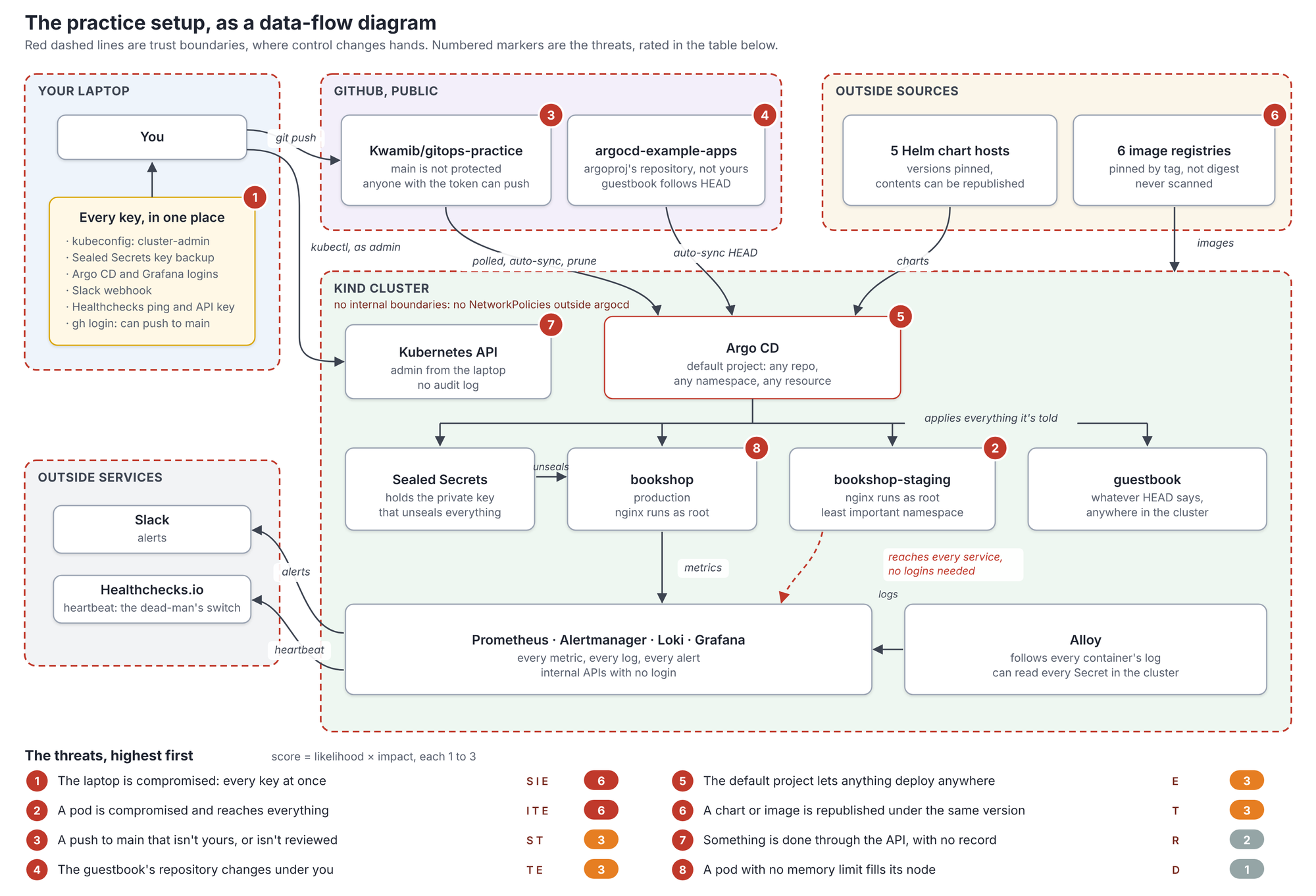
The numbered markers are the threats from the rating below, placed where each one lives. Every arrow that crosses a red dashed line crosses a trust boundary, and that's where threats live. Five boundaries here: the laptop, GitHub, the outside sources, the cluster, and the outside services. Inside the cluster there's no boundary at all, which is Lesson 1's NetworkPolicy finding, drawn.
What can go wrong? STRIDE
Staring at a diagram asking "what could go wrong?" finds the obvious threats and misses the rest. STRIDE, from Microsoft, is a checklist: six kinds of threat, each the opposite of something you want.
| Threat | Means | Breaks | Example here |
|---|---|---|---|
| Spoofing | Pretending to be someone or something else | Authentication | Using the laptop's gh token to push as you |
| Tampering | Changing data or code without permission | Integrity | A commit in the guestbook's repository; a silence in Alertmanager |
| Repudiation | Doing something with no record it was you | Non-repudiation | Reading a Secret through the API: no audit log says who |
| Information disclosure | Seeing what you shouldn't | Confidentiality | Every namespace's logs from Loki; the Sealed Secrets key |
| Denial of service | Stopping it working | Availability | A pod with no memory limit filling its node |
| Elevation of privilege | Getting more rights than you were given | Authorization | Root in nginx, then the node; a pod's way to Argo CD's powers |
The method: take each part and each arrow of the diagram, and ask all six. Most cells are empty or minor; a few aren't. Here are the ones that aren't, for the parts that matter:
- The laptop. Spoofing: its
ghlogin can push as you; its kubeconfig is you, ascluster-admin. Information disclosure: the Sealed Secrets key backup decrypts every SealedSecret in a public repository's history. One piece of malware, one stolen unlocked laptop, or one badgit add -fis everything at once. mainon GitHub. Tampering: a push, from you or from anything holding your token, deploys itself within minutes: no pull request, no check. Repudiation: commits aren't signed, so a commit "from you" proves nothing.- The guestbook's repository. Tampering, then elevation of privilege: a commit there becomes resources here, and the
defaultproject allows any of them, cluster-wide. - Argo CD. Elevation of privilege: it can do anything, so anything that can tell it what to do, any source repository, can too. That's why its sources matter more than its pods.
- A bookshop pod (Lesson 1). Elevation of privilege: nginx runs as root. Information disclosure and tampering: from it, every metric, every log, and alerts silenced.
- Monitoring. Tampering: a silence hides the alert that would have caught the rest. Repudiation: no audit log of who made it.
- The outside sources. Tampering: a chart or image republished under the same version.
Rating them
Not every threat is worth the same effort. A simple rating: likelihood (how easily, how often) times impact (how much it would hurt), each from 1 to 3. It's rough on purpose; the point is the order, not the numbers.
| Threat | STRIDE | Likelihood | Impact | Score | Response |
|---|---|---|---|---|---|
| The laptop is compromised: kubeconfig, key backup, tokens | S, I, E | 2 | 3 | 6 | Reduce: disk encryption, key backup off the laptop, short-lived logins |
| A pod is compromised and reaches everything | I, T, E | 2 | 3 | 6 | Reduce: Lesson 9 (NetworkPolicies, non-root, Pod Security) |
A push to main that isn't yours, or isn't reviewed | S, T | 1 | 3 | 3 | Reduce: branch protection and required checks, now |
| The guestbook's repository changes under you | T, E | 1 | 3 | 3 | Remove: delete the guestbook, now |
Everything in the default project, with no limits | E | 1 | 3 | 3 | Reduce: an AppProject per purpose, later |
| A chart or image republished under the same version | T | 1 | 3 | 3 | Reduce: Lesson 6 (digests, scanning) |
| Something done through the API, with no record | R | 2 | 1 | 2 | Reduce: Lesson 10 (audit log) |
| A pod with no memory limit takes down a node | D | 1 | 1 | 1 | Accept for now; limits in Lesson 9 |
The order changed. Lesson 1's findings were all inside the cluster, because that's where a first look looks. The threat model puts the laptop at the top, tied with a compromised pod, and puts two of the quickest fixes in the whole track, branch protection and removing the guestbook, right behind. Neither appeared in Lesson 1 at all.
Why the laptop scores a 2 for likelihood: it's where you browse, install tools and open attachments, and it's the one machine holding every key. Why a push to main scores a 1: your GitHub account has two-factor authentication, and only you can push. A 1 isn't a 0, and the impact is the whole cluster.
What are we going to do about it?
Four kinds of answer, for every threat:
- Remove the thing that's at risk. The guestbook was a first-lesson example, and nothing depends on it.
- Reduce the likelihood or the impact. Most of the list.
- Transfer it to someone better placed: a managed service, an insurer, a vendor's contract.
- Accept it, on purpose, and write down why. A pod filling a laptop's node is acceptable; the same in production isn't.
Three are quick enough to do before the next lesson:
- Remove the guestbook. Delete
argocd/guestbook.yamlin a pull request; the root Application prunes it, and the guestbook namespace's contents go with it. - Protect
main. In the repository's settings, a ruleset formain: require a pull request, block force-pushes and deletion. With one person, the review rule has to allow you to merge your own; the value is that nothing reaches the cluster without passing through a pull request, where checks can run. - Move the Sealed Secrets key backup off the laptop's repository folder. Into the password manager, or an encrypted file somewhere else. It's ignored by Git today; the point is that one mistake shouldn't be enough to publish it.
The rest are the track: Lesson 5 for secrets and encryption at rest, Lesson 6 for images and charts, Lesson 9 for the compromised pod, Lesson 10 for the audit log.
Did we do a good job?
Two checks, after the fixes: does the threat model still match the system (a new app, a new outside service, a new person with access each mean redrawing), and did each fix actually work, tested the way the first look tested the problems. For the guestbook, kubectl get ns guestbook should say it's gone; for branch protection, a direct push to main should be refused. A threat model that's never checked is a drawing.
In real systems
- Threat model before building, and when it changes. An hour at the design stage finds what a month of fixing later costs. A new trust boundary, such as a new outside service or a new kind of user, is the signal to redo it.
- Do it with the people who build it. The engineers know how the system really works; the security person knows the questions. Neither finds as much alone.
- Keep it next to the code. The diagram and the rated list, in the repository, updated in the same pull request as the change that alters them.
- The people and the laptops are part of the system. Most real breaches start with a phished login or a stolen token, not a clever exploit. A diagram with no laptops on it is missing the most likely way in.
- Pin what you deploy from. A GitOps tool following someone else's branch is running their code with your permissions. Follow your own repository, and pin outside sources to a commit or a version.
Spot the problem
Work out what's wrong before you read the explanation.
"The repository's public, but the secrets are sealed, so it's fine." A team keeps their cluster's configuration in a public GitHub repository, with every Secret sealed. That's the textbook way. One of them keeps the backup of the Sealed Secrets private key in the repository's folder, in .sealed-secrets-key.yaml, ignored by Git, just like this one. A year later, someone tidies up the .gitignore file and removes the line. The next git add . picks up the key. What does that cost? Every secret the repository has ever held. Sealing protects a secret with one key; with the key public, anyone can decrypt every SealedSecret in the repository's history, including ones rotated long ago that may still work somewhere. Deleting the commit doesn't help: public repositories are copied by forks and by automated scanners within minutes. The model's answer is that the key's location was the threat, not the .gitignore line: one ordinary change was enough to publish it. Keep the key's backup somewhere one git add can't reach, and if it ever leaks, treat every sealed secret as leaked: make a new key, re-seal, and change every value.
Keep this
| To | Use |
|---|---|
| Structure the work | Four questions: what are we working on, what can go wrong, what will we do, did we do a good job |
| Draw the system | A data-flow diagram: parts, data stores, flows, trust boundaries |
| Find the threats | STRIDE on each part and each flow that crosses a boundary |
| Rank them | Likelihood times impact, 1 to 3 each |
| Respond | Remove, reduce, transfer or accept, and write down which |
| List Secrets without values | kubectl get secrets -A -o json | jq on name, type, number of keys |
| See what changes the cluster | kubectl get applications -n argocd -o json | jq on source and sync policy |
| See what an Argo CD project allows | kubectl get appproject NAME -n argocd -o json |
| Check a branch's protection | gh api repos/OWNER/REPO/branches/main/protection |
| See who can push | gh api repos/OWNER/REPO/collaborators |
Where you are now
You can model a system's threats: draw it, walk it with STRIDE, rate what you find, and decide what to do about each. The practice setup's model put the laptop and the deploy path at the top, ahead of everything inside the cluster, and gave three quick fixes. The next lesson goes to the most common target of all, an ordinary Linux server, and hardens one from scratch: logins by key only, a firewall, automatic security updates, and the least access for every user.
Check yourself
What does threat modeling add to a list of findings?
Where do threats usually live on a data-flow diagram?
A commit to the guestbook's repository creates a ClusterRoleBinding here. Which STRIDE threats?
Why did the laptop rank above the in-cluster findings?
With one person, what does protecting main still buy?
Your Sealed Secrets key leaks. What's the right response?
Key terms
- Threat modeling: working out what an attacker would want, how they'd get it, and what to do about it, before or after building.
- Asset: anything worth protecting: data, secrets, access, availability.
- Data-flow diagram: a drawing of a system's parts, data stores and flows, with its trust boundaries.
- Trust boundary: a line where control changes hands, such as between GitHub and the cluster.
- Attack surface: every way in to a system, together.
- STRIDE: spoofing, tampering, repudiation, information disclosure, denial of service, elevation of privilege.
- Non-repudiation: being able to prove who did something.
- AppProject: Argo CD's limit on what an Application may deploy, from which repositories, to where.
- Branch protection: GitHub's rules for a branch, such as requiring a pull request before changes reach it.
- Risk response: removing, reducing, transferring or accepting a risk.
Go deeper
- Adam Shostack's Threat Modeling Manifesto (opens in a new tab), written with others who do this for a living, and his book Threat Modeling: Designing for Security.
- OWASP's Threat Modeling Cheat Sheet (opens in a new tab).
- Argo CD's documentation on projects (opens in a new tab), and GitHub's on rulesets (opens in a new tab).
- Try: draw a data-flow diagram for something of your own, such as a website you run, and do STRIDE on every flow that crosses a boundary. Which of your threats isn't about the code at all?
- Try: the three quick fixes from this lesson, then check each worked: the guestbook namespace gone, and a direct
git pushtomainrefused.