By the end you'll know
- How to reach Argo CD's API and web interface from your computer, with a port-forward
- Why the first login says
--insecure, and what that does and doesn't mean - Where the first admin password comes from, and why you replace it
- How to ask Argo CD about an app: its resources, history, diff and rendered YAML
- What happens to drift when self-heal is off, and how to sync by hand
Before you start
- You need: Lesson 1 done, with the
gitopscluster and the guestbook Application. If you've restarted your computer, start Docker, thendocker start gitops-control-plane gitops-worker. - Install the CLI:
brew install argocd. - Get the new files: in
gitops-practice,git pull. There's a.gitignorenow, for the password file this lesson makes. - Where commands run: your own computer's terminal. The port-forward needs a terminal of its own.
The short version
- Getting in. Argo CD's API and web interface run inside the cluster. A port-forward makes them reachable at
https://localhost:8080, with a self-signed certificate, so the first login uses--insecure. - Asking questions. The
argocdtool shows what an app is made of, which commit it's on, how it differs from Git, and the exact YAML it applies. - Drift, reported. With self-heal off, a hand change made the app
OutOfSync, and stayed that way until a sync by hand. - Housekeeping. The first admin password was replaced, and the secret holding it deleted, as Argo CD's documentation recommends.
Two ways in
Lesson 1 used kubectl for everything: it applied the Application, and read its status from Kubernetes. That works, because an Application is an ordinary Kubernetes object. But Argo CD has its own two front doors, and most day-to-day work goes through them:
argocd, a command-line tool, for scripts and quick questions.- The web interface, for seeing a whole app at once.
Both talk to the same thing: the argocd-server pod from Lesson 1, which serves Argo CD's API. Think of a building's reception desk. kubectl is the staff entrance, straight to the filing cabinets. The reception desk can tell you what's in them, why, and what's changed since yesterday.
Installing the CLI
brew install argocd
argocd version --client --short
argocd: v3.4.1+bafd59b.dirty
Homebrew's build is a minor version behind the server installed in Lesson 1, which is 3.5.7. That's fine here, and common: the tool and the server usually get along across nearby versions. If a command ever behaves oddly, mismatched versions are worth ruling out first. (The .dirty is just how that build was labelled.)
Reaching the server: a port-forward
argocd-server runs inside the cluster, with no address your computer can reach. The Kubernetes track's answer works here too: a port-forward, which passes traffic from a port on your computer to a Service in the cluster. In its own terminal, because it keeps running:
kubectl port-forward svc/argocd-server -n argocd 8080:443
Forwarding from 127.0.0.1:8080 -> 8080
Forwarding from [::1]:8080 -> 8080
Port 8080 on your computer now leads to Argo CD. In another terminal:
curl -sk -o /dev/null -w "%{http_code} from https://localhost:8080\n" https://localhost:8080/
curl -sv https://localhost:8080/ 2>&1 | grep "SSL certificate problem"
200 from https://localhost:8080
* SSL certificate problem: self-signed certificate
It answers, over HTTPS. But its certificate is self-signed: Argo CD made it for itself at install time, and nothing your computer trusts has vouched for it. From the Networking track: the connection is still encrypted, but your computer can't prove who's on the other end. On a port-forward to your own laptop, you already know who's on the other end, so that's acceptable here. On a real cluster, Argo CD sits behind a proper certificate, like any other website.
The first password
At install, Argo CD makes an admin account with a random password, and keeps it in a Kubernetes Secret called argocd-initial-admin-secret:
kubectl get secret argocd-initial-admin-secret -n argocd -o jsonpath="{.data.password}" | wc -c
24
24 characters: the password, base64-encoded. Base64 isn't encryption. Anyone who can read the Secret can decode it with base64 -d, which is exactly how you log in:
argocd login localhost:8080 --username admin \
  --password "$(kubectl get secret argocd-initial-admin-secret -n argocd -o jsonpath='{.data.password}' | base64 -d)" \
  --insecure
argocd version --short
argocd account get-user-info
'admin:login' logged in successfully
Context 'localhost:8080' updated

argocd: v3.4.1+bafd59b.dirty
argocd-server: v3.5.7

Logged In: true
Username: admin
Issuer: argocd
Groups:
--insecure tells the tool to accept that self-signed certificate. It doesn't switch off encryption, only the check of who's at the other end. Context 'localhost:8080' updated: like kubectl, the tool remembers which server you logged in to, so the commands after this don't repeat it. And argocd version now shows both sides: the tool on your computer, and the server in the cluster.
The web interface
With the port-forward running, open https://localhost:8080 in a browser. It warns about the certificate, for the same reason curl did; continue past it. Log in as admin.
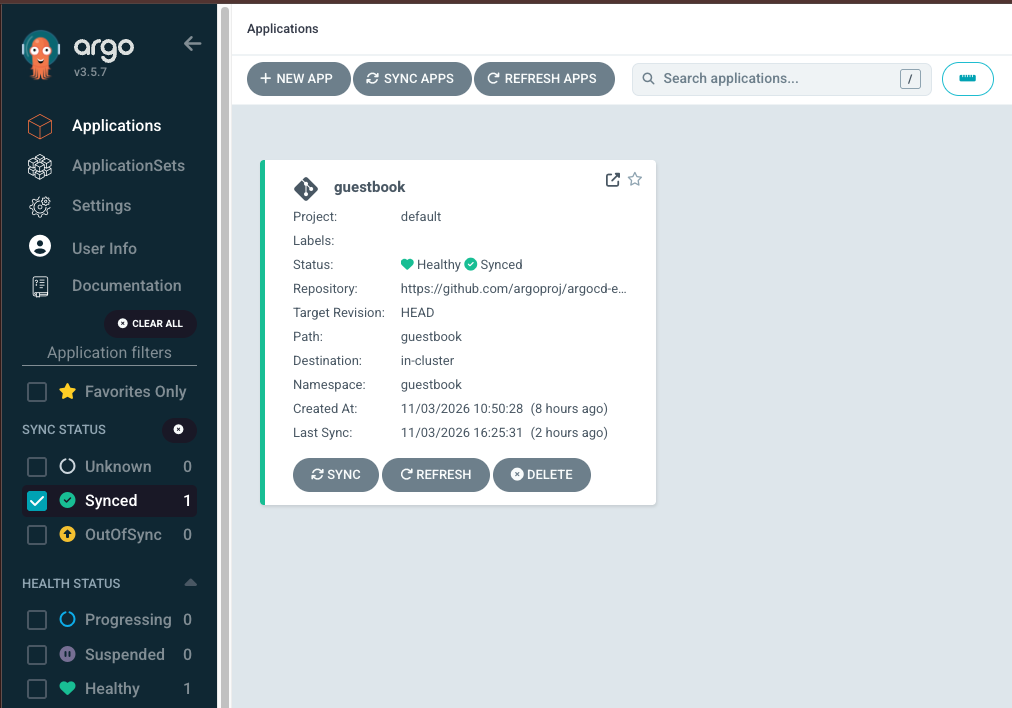
Everything from Lesson 1's Application is on one card: the repository, HEAD, the guestbook path, the destination (in-cluster is Argo CD's name for the cluster it runs in), and the two statuses, Healthy and Synced. The filters on the left count apps by status: one Synced, one Healthy. Click the card, and you see the app's resources as a tree: the Application, then the Service and the Deployment, then its ReplicaSet and pod. It's the same information the CLI gives, laid out so you can see a whole app at a glance, which is what most people use it for.
What Argo CD can tell you
The CLI's view of the same app:
argocd app list
NAME              CLUSTER                         NAMESPACE  PROJECT  STATUS  HEALTH   SYNCPOLICY  CONDITIONS  REPO                                                 PATH       TARGET
argocd/guestbook  https://kubernetes.default.svc  guestbook  default  Synced  Healthy  Auto-Prune  <none>      https://github.com/argoproj/argocd-example-apps.git  guestbook  HEAD
argocd app get guestbook
Name:               argocd/guestbook
Project:            default
Server:             https://kubernetes.default.svc
Namespace:          guestbook
URL:                https://localhost:8080/applications/guestbook
Source:
- Repo:             https://github.com/argoproj/argocd-example-apps.git
  Target:           HEAD
  Path:             guestbook
SyncWindow:         Sync Allowed
Sync Policy:        Automated (Prune)
Sync Status:        Synced to HEAD (8088f4c)
Health Status:      Healthy

GROUP  KIND        NAMESPACE  NAME          STATUS  HEALTH   HOOK  MESSAGE
apps   Deployment  guestbook  guestbook-ui  Synced  Healthy        deployment.apps/guestbook-ui created
       Service     guestbook  guestbook-ui  Synced  Healthy
The app, where it comes from, Synced to HEAD (8088f4c), the same commit as Lesson 1, and every resource it manages, each with its own status. (The summary line says Automated (Prune) and doesn't mention self-heal. The setting is there; the summary just doesn't show it.) Four more questions it can answer:
argocd app history guestbook
argocd app diff guestbook; echo "diff exit code: $?"
argocd app manifests guestbook | head -30
argocd cluster list
ID      DATE                           REVISION
0       2026-11-03 10:50:29 -0500 EST  HEAD (8088f4c)

diff exit code: 0

---
apiVersion: v1
kind: Service
metadata:
  annotations:
    argocd.argoproj.io/tracking-id: guestbook:/Service:guestbook/guestbook-ui
  name: guestbook-ui
  namespace: guestbook
spec:
  ports:
  - port: 80
    targetPort: 80
  selector:
    app: guestbook-ui
...

SERVER                          NAME        VERSION  STATUS      MESSAGE  PROJECT
https://kubernetes.default.svc  in-cluster  v1.35.0  Successful
app history: each version deployed, with its commit. One so far. Lesson 9 rolls back to an earlier entry.app diff: how the cluster differs from Git. Nothing, and exit code 0. Likediffitself, it exits 1 when there's a difference, so a script can check.app manifests: the exact YAML Argo CD applies. Here it's the repository's files, plus one annotation,tracking-id, which is how Argo CD marks what belongs to which app. Once Helm arrives in Lesson 5, this is how you see what a chart turns into.cluster list: the clusters it manages: just this one, running Kubernetes v1.35.0.
Drift, reported instead of fixed
Lesson 1's Application has selfHeal: true, so hand changes are undone in seconds. Turn it off, and see the difference:
argocd app set guestbook --self-heal=false
kubectl scale deployment guestbook-ui -n guestbook --replicas=2
sleep 8
argocd app get guestbook | grep -E "Sync Status|Health Status"
Sync Status:        OutOfSync from HEAD (8088f4c)
Health Status:      Healthy
OutOfSync, and it stays that way. Argo CD noticed, and reported it, and did nothing. Healthy still: two copies of the app run perfectly well. It just isn't what Git says. What's different?
argocd app diff guestbook; echo "diff exit code: $?"
===== apps/Deployment guestbook/guestbook-ui ======
107c107
<   replicas: 2
---
>   replicas: 1
diff exit code: 1
The < line is the cluster, the > line is Git: 2 copies running, Git says 1, and exit code 1. Now a person decides. To put it back, sync by hand:
argocd app sync guestbook
kubectl get deployment guestbook-ui -n guestbook
Message:            successfully synced (all tasks run)

GROUP  KIND        NAMESPACE  NAME          STATUS  HEALTH   HOOK  MESSAGE
       Service     guestbook  guestbook-ui  Synced  Healthy        service/guestbook-ui unchanged
apps   Deployment  guestbook  guestbook-ui  Synced  Healthy        deployment.apps/guestbook-ui configured

NAME           READY   UP-TO-DATE   AVAILABLE   AGE
guestbook-ui   1/1     1            1           5h34m
One copy again. The Deployment was configured, changed back in place, and the Service unchanged. Its age, 5 hours 34 minutes, says it's the same Deployment, adjusted, not a new one. That's the screenshot's "Last Sync" too: the time of this sync by hand. Then self-heal goes back on:
argocd app set guestbook --self-heal
So, two ways to run: self-heal on, and the cluster always matches Git, whoever touches it; or self-heal off, and drift is reported for a person to decide. Lesson 4 looks at when each is the right choice.
Replacing the first password
The first password sits in a Secret anyone with access to the argocd namespace can read. Argo CD's documentation says to change it, and delete that Secret:
openssl rand -base64 18 > .argocd-admin && chmod 600 .argocd-admin
argocd account update-password --account admin \
  --current-password "CURRENT" --new-password "$(cat .argocd-admin)"
kubectl delete secret argocd-initial-admin-secret -n argocd
argocd login localhost:8080 --username admin --password "$(cat .argocd-admin)" --insecure
ls -l .argocd-admin; git check-ignore -v .argocd-admin
Password updated
Context 'localhost:8080' updated

secret "argocd-initial-admin-secret" deleted

'admin:login' logged in successfully
Context 'localhost:8080' updated

-rw-------  1 you  staff  25 Nov  3 16:25 .argocd-admin
.gitignore:1:.argocd-admin	.argocd-admin
A random password, kept in a file only you can read, which git ignores, like .vault_pass in the Ansible track. The old password no longer works, and the Secret that held it is gone. (Use CURRENT for the password you logged in with; the Secret has to still exist when you read it, so read it before you delete it.)
In real systems
- Nobody logs in as admin. Teams connect Argo CD to their single sign-on, like GitHub, Google or Okta, through the
dexpod from Lesson 1, and give people roles: read-only for most, sync for some, admin for very few. Once that works, theadminaccount is switched off. - The web interface is a real website. It sits behind an Ingress or a Gateway, from the Kubernetes track, with a proper certificate, and usually only on the company network or a VPN. Never exposed to the internet with
adminenabled. - Pipelines use tokens, not passwords. A CI/CD job that needs to ask Argo CD something, like "is the new version healthy yet?", uses a token for a limited account, made with
argocd account generate-token. - The CLI and the interface change nothing Git doesn't. Even
argocd app synconly syncs to what's already in Git. To change what runs, you still change Git.
Spot the problem
Work out what's wrong before you read the explanation.
The quiet weekend. A team turns self-heal off on their production apps, to be careful: drift should be reported, and a person decides. On Friday, someone scales a payments service down to one copy by hand, to save money, and forgets. Argo CD marks it OutOfSync. Nobody opens the web interface over the weekend. On Saturday, traffic spikes and the single copy falls over. Argo CD knew all along. What was missing? A report nobody sees isn't a report. With self-heal off, OutOfSync is the whole safety net, so it has to reach a person: an alert from the notifications controller to chat or email, or a check on Argo CD's metrics in the monitoring stack, as the Monitoring track will do. Either turn self-heal on, or make OutOfSync page someone. Turning it off and watching nothing is the worst of both.
Keep this
| To | Run |
|---|---|
| Install the CLI | brew install argocd |
| Reach the server, in its own terminal | kubectl port-forward svc/argocd-server -n argocd 8080:443 |
| Read the first password | kubectl get secret argocd-initial-admin-secret -n argocd -o jsonpath="{.data.password}" | base64 -d |
| Log in, accepting the self-signed certificate | argocd login localhost:8080 --username admin --insecure |
| Both versions | argocd version --short |
| List apps | argocd app list |
| An app's details and resources | argocd app get guestbook |
| What it's deployed, and when | argocd app history guestbook |
| How the cluster differs from Git | argocd app diff guestbook; exit code 1 if different |
| The YAML it applies | argocd app manifests guestbook |
| Turn self-heal off, or on | argocd app set guestbook --self-heal=false, --self-heal |
| Sync by hand | argocd app sync guestbook |
| Change a password | argocd account update-password --account admin |
| The web interface | https://localhost:8080, with the port-forward running |
Where you are now
You can reach Argo CD from the command line and the browser, ask it what an app is made of and how it differs from Git, and sync by hand when self-heal is off. The admin password is your own. Everything so far has come from Argo CD's example repository. Lesson 3 points Argo CD at your repository, gitops-practice, so that a commit you make is what changes the cluster.
Check yourself
Why does the first login use --insecure?
The first admin password is in a Secret, base64-encoded. Is that safe?
argocd app diff exited with code 1. What does that mean?
With self-heal off, the app was scaled to 2 by hand. What did Argo CD do?
What does argocd app manifests show?
Why does the sync by hand change nothing Git doesn't say?
Key terms
- argocd: Argo CD's command-line tool, which talks to its API.
- argocd-server: the pod that serves Argo CD's API and web interface.
- Port-forward: passing traffic from a port on your computer to a Service inside the cluster.
- Self-signed certificate: one a server made for itself, which nothing your computer trusts has vouched for.
- Base64: a way of writing data as plain text. Not encryption: anyone can decode it.
- Context: the server the CLI remembers you logged in to.
- app diff: how the cluster differs from what Git says, for one app.
- Sync: making the cluster match Git, either automatically or by hand.
- in-cluster: Argo CD's name for the cluster it runs in.
Go deeper
- The Argo CD documentation: Getting started (opens in a new tab), and the argocd command reference (opens in a new tab).
- Try: in the web interface, click the guestbook card, then the Deployment in the tree, and find its Diff and Events tabs. Scale it by hand, and watch them change.
- Try:
argocd app get guestbook -o yaml | less. FindselfHeal, and the list of resources with their sync status. It's the same objectkubectl get applicationreads.